On m.telsonic.com if users click on "deutsch" Link they get a 403 forbidden nginx Error. Why is that? URL d.telsonic.com is correct and works everywhere else!
On m.telsonic.com if users click on "deutsch" Link they get a 403 forbidden nginx Error. Why is that? URL d.telsonic.com is correct and works everywhere else!

Hello,
Thanks for writing us!
Can you give me a bit more context please, was this working before?
I see once you go to other languages, you can go to DE correctly.
What changes were made before this error occurred?
Please check the desktop site and let me know,
Once I have more information I can check in depth,
Thank you!

Hi Paola,
enter "telsonic.com" in your mobile browser. (redirected to m.telsonic.com)
Then tap on "deutsch" to switch to german language version (d.telsonic.com is the subdomain).
I made these links manually in duda Editor - they were always the same. And you're right, in other version's the same "deutsch" link works perfectly fine, that's why i can't figure out what the 403 Error is about!
Thank you,
Ole
I understand how to see the issue, I see the issue.
I am asking what changed, what did you do last in editor or HTML desktop site before you noticed the DE link was going to 404?
I need to understand what changes you made that may have caused this.
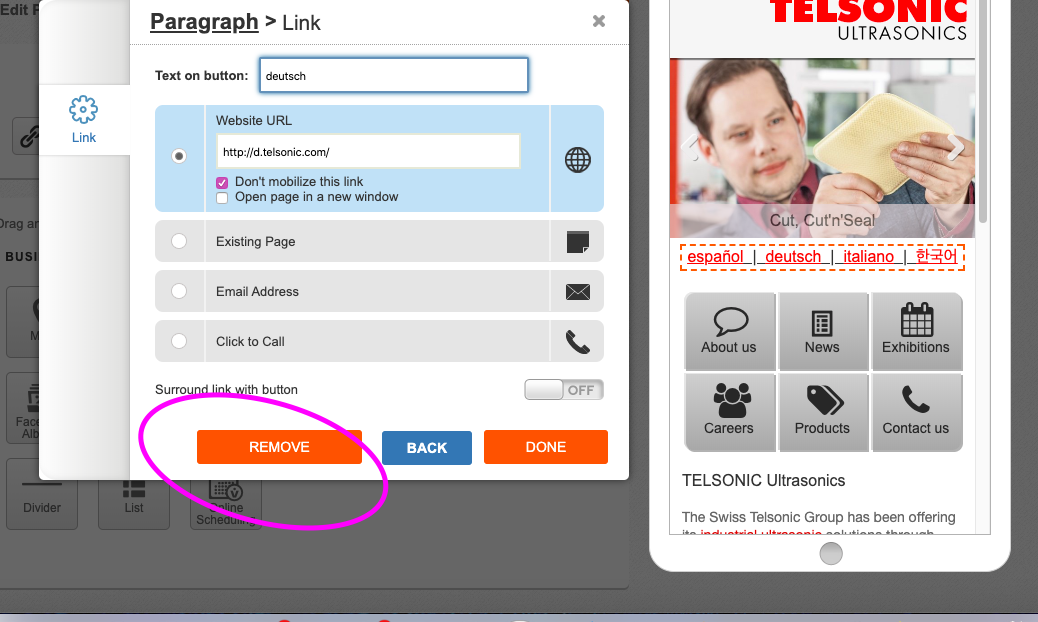
"I made these links manually in duda Editor - they were always the same." can you unlink and relink in the Duda mobile editor please?
Thanks,
Hi,
the only i made were on other pages (exhibitions, news, career). Nobody made any changes on homepage - whether on desktop nor on mobile site.
The "language switch textlinks" were made years before, never changed and always worked... until someone told me about the 403 error which occured just recently.
How to "unlink and relink" the editor?
Ole
Hello,
Apologies for the delays here, its a community forum and not a formal support forum.
Nothing has changed in Dudamobile editor/platform. But maybe something changed in the desktop site? telsonic.com? Possible?
Before I check further, I will need you to recreate those links > click on the paragraph links > Edit Links > and > remove de DE and then re-add it.
If that doesnt help let us know,
 ×
×
Priority Phone Support is available exclusively to Pros. Log in to your Pro account now to see our international support numbers.
Log In